
Google has just rolled out a significant update to its Chrome browser, integrating advanced AI features that push the boundaries of how people navigate and interact with the web. Rather than incremental tweaks, this change reflects a deeper strategy to make the browser not just a conduit for web pages, but an intelligent assistant that helps users complete complex tasks, interpret content, and streamline workflows. The update centers on three key additions: an AI side panel, Nano Banana image tools, and a new agent-based “Auto Browse” capability. These features collectively represent a shift toward a more proactive, assistant-oriented browsing experience.
In this article, we’ll unpack what each feature does, why it matters, and how it could influence productivity, security, and user expectations. We’ll also consider broader implications — especially for finance, digital workflows, and enterprise usage.
Source: Searchenginejournal
What’s New in Chrome: The 3 AI Features Explained
1. AI Side Panel: Persistent Intelligence Across Tabs
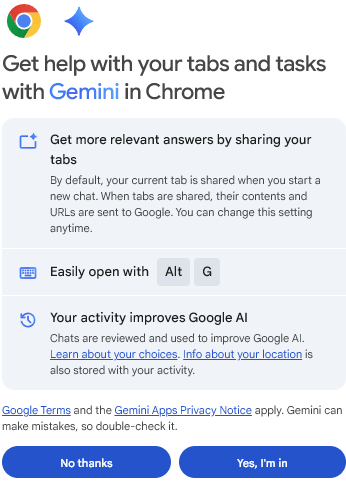
The most visible change in Chrome’s latest update is the introduction of a dedicated AI side panel. This panel is anchored to the right side of the browser window and remains accessible across all open tabs. It’s powered by Google’s Gemini AI and acts as a multi-purpose assistant:
- Users can ask natural-language questions without leaving the current page.
- The assistant can summarize content, compare pages, extract insights, and fetch context across tabs.
- It enables rapid multitasking — for example, researching product features on one tab while synthesizing reviews on another.
What makes this approach distinctive is that it doesn’t isolate AI behind a separate app or tab. Instead, AI is woven into the browsing experience, reducing context-switching and enhancing productivity for tasks like financial research, market comparisons, or regulatory reviews, where users often juggle multiple sources.
2. Nano Banana: Integrated Image Generation and Editing
Perhaps the most experimental component of the update is “Nano Banana” — Google’s AI image generation and editing tool — now embedded directly into Chrome. Instead of downloading images, switching to a separate AI app, and re-uploading to edit, users can now prompt Nano Banana right within the browser to alter images they encounter online (e.g., redesign an interface screenshot, visualize product variations, or generate illustrative charts).
In practical terms, this feature can support workflows where visuals matter:
- Marketing teams can quickly mock up creative variations.
- Product designers can prototype changes without leaving the browser.
- Financial analysts can turn raw data into clear visual narratives (charts, infographics) before exporting them to reports.
Because the tool lives in the browser, Nano Banana cuts friction out of creative loops — a meaningful productivity gain for professionals who move between research and presentation.
3. Auto Browse: AI That Acts, Not Just Answers
The most profound shift is the agentic capability dubbed Auto Browse. This feature lets the AI perform multi-step tasks on behalf of the user, such as:
- Comparing hotel and flight prices over multiple date ranges.
- Looking up service quotes for plumbers or contractors.
- Filling out forms using stored credentials.
- Gathering financial documents or managing routine online errands.
Auto Browse is currently rolling out to US users with Google AI Pro and Ultra subscriptions. It elevates AI from a passive assistant — one that answers questions — to an active agent that can autonomously navigate websites, interact with forms, and synthesize results. Although Chrome still requires user confirmation for purchases and sensitive actions, this capability signals a future where browsers can handle increasingly complex tasks.
How These Features Change User Workflows
Enhanced Productivity Without Context Switching
Traditionally, users have had to juggle many tabs to compare information, draft emails, or collect data. Chrome’s side panel and Auto Browse reduce that friction by:
- Placing AI tools directly beside the content users engage with.
- Cross-referencing information from tabs, emails, calendars, and other Google apps.
- Automating repetitive, manual actions that would otherwise consume valuable time.
This is especially relevant for professionals in finance and banking, where data comes from multiple dashboards, filings, and pricing feeds, and dashboards. Instead of toggling between tools, an AI-stickied interface can centralize insights and even automate routine research workflows.
New Possibilities in Content Creation and Visualization
Nano Banana bridges query and creation. In business contexts — such as investment reports or pitch decks — professionals often rely on external design tools to generate visual content. Embedding such capability within the browser accelerates ideation and reduces reliance on separate applications.
But there’s more than convenience. By allowing AI to interpret and transform visual inputs in place, Chrome supports workflows that blend analysis, communication, and storytelling without leaving the context of research.
Toward a More “Agentic” Web
Auto Browse reflects a broader push toward agentic AI, where systems take proactive steps rather than just answering queries. This aligns with trends across AI browsers and assistants, but is notable in Chrome because:
- Google combines agentic action with deep connections to user data (with consent), such as Gmail, Calendar, and Google Shopping.
- The browser can synthesize context — like event details from emails — to deliver relevant responses or complete tasks.
This is a subtle but fundamental shift: browsers are transitioning from being tools for retrieval to platforms for execution. For knowledge workers, that means less time spent manually coordinating actions and more time focusing on strategic decisions.
Security, Privacy, and User Control
With greater capability comes greater responsibility. Google has emphasized security and control:
- Users must consciously opt into AI features, particularly those that use browser data.
- Auto Browse pauses before sensitive steps like purchases or social posts.
- The integration respects existing Google security defenses, such as password management and scam detection.
This cautious approach acknowledges that agentic AI raises legitimate privacy and security questions, particularly when it can access user credentials or personal data across services.
Competitive Context: Browsers Becoming AI Platforms
Chrome’s update doesn’t occur in isolation. Rival AI-centric browsers — such as Perplexity’s Comet and OpenAI’s Atlas — are also building generative AI into browsing environments, each with its own take on how assistants should function. Chrome’s advantage lies in scale: it combines a trusted browser with deep AI models and ecosystem integration, making it a plausible default for both everyday users and professionals.
However, as these tools proliferate, users and businesses will think carefully about:
- Data privacy: How much personal data should AI have access to?
- Control and transparency: How can users oversee automated tasks?
- Monetization: If browsers become action platforms, what does that mean for search and advertising revenue models?
These questions matter for finance and banking platforms that depend on predictable referral traffic and user trust.
FAQs: Chrome’s New AI Features
What are the three new AI features in Chrome?
Chrome now includes an AI side panel for in-browser assistance, Nano Banana for image generation and editing, and Auto Browse, an agentic feature that can perform multi-step tasks.
Is Nano Banana available to all Chrome users?
Yes, the image tools are available to logged-in Chrome users in the U.S. and can edit or transform images directly within the browser window.
How does Auto Browse work?
Auto Browse uses Gemini AI to carry out complex online tasks such as cost comparisons, form filling, and travel research. Final user confirmation is required for purchases or postings.
Will these features affect browser privacy?
Users must opt in to AI features, and Chrome is designed to pause or request confirmation before sensitive actions. Data usage and privacy controls are part of the settings.
Are these AI features available globally?
At launch, many features are rolling out primarily in the United States, with broader availability expected over time.
As a trusted digital marketing agency in India, we create impactful strategies that strengthen your brand and connect you with the right audience. Contact us today to get expert digital marketing services in India designed for long-term success.